Exchange 2007 consists of a number of roles, one of which is the UM role. UM requires separate Client Access Licenses and enables the following additional functionality over standard Exchange: Unified store for email, fax, and voice messaging. The Exchange UM role controls the receipt of voicemail, configuration of answer message, fax receipt, and other functions.
Access to a unified store from both a computer and from a phone using voice commands (voice user interface) or numeric key presses (telephone user interface) which collectively are known as Outlook Voice Access. Phone access also includes the ability to search Global Address List, check calendars, accept/reject meetings, and an Auto Attendant is provided to give guidance on feature access.
Essentially, the UM role does exactly what the name suggests. It provides the ability to access your voice messages, fax, and email from a single location via computer or phone. The UM can hook directly into many IP PBX telephone systems that serve a specific business or company. Companies using traditional non-IP PBX systems must install a gateway between the PBX and the UM servers to facilitate communication.
OCS 2007 is a separate product from Exchange, but can integrate heavily with Exchange to give a complete communication solution. OCS 2007 focuses on real-time communication while Exchange is primarily a message store. OCS 2007 provides the following features: Secure and archivable IM for an organizations users with connectivity to public IM services such as Yahoo and Windows Live Messenger through Public IM Connectivity (PIC), which is a separate license. OCS can also federate with other organizations' OCS implementations to allow communication via IM with partner companies without the need to use public IM services.
Presence information showing if a contact is currently online, busy, in a meeting, or so on. This information is visible in many mediums, including Outlook and SharePoint, and can be used to initiate communication through IM, voice, or a meeting scheduling.
File Transfer capabilities.
Peer-to-peer and multiparty conferencing services, including voice and video with web accessibility. Live Meeting client is used to access the services or the web-based interface.
When you combine Exchange 2007, Exchange 2007 UM, and OCS, you have a Unified Communications solution which gives single store access to all your e-mail, fax, and voice messages. You also have a rich interface for real-time communication, whether it be voice, text, video, or meeting-based, with presence information available to help choose the best way to contact people. The traditional divide between your phone system and your computer-based solutions is removed with UC.
For full info visit: http://windowsitpro.com/mobile/pda/Article.cfm?ArticleID=101637&FAQ=1
Showing posts with label exchange 2007 server. Show all posts
Showing posts with label exchange 2007 server. Show all posts
Monday, March 30, 2009

Tuesday, December 9, 2008
How to Creating mail users in Exchange Server 2007
Mail users are actual accounts in your Active Directory, but their email does not reside within your Exchange environment; they use their own messaging system, Hotmail account, etc. This may sound a lot like a contact, but the difference is that a contact is an object that represents someone who neither has a mailbox in your Exchange environment nor an Active Directory account, whereas the mail user still has an Active Directory account.
To create a mail user in the Exchange Management Console, begin by navigating to the Mail User node under Recipient Configuration in the console tree. In the action pane, click the New Mail User link (Figure A) to start the New Mail User Wizard.
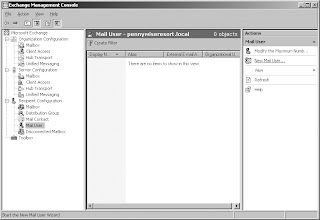
Navigate to the Mail User node:-
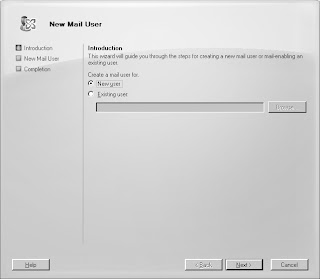
Beginning the New Mail User Wizard:-
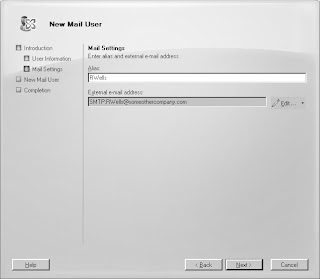
Since you are creating a user within Active Directory, you first need to provide user account information on the User Information page of the wizard, as shown in Figure 3-35. Then, because the user will utilize an outside messaging system, you will need to provide his or her external email address, as shown in Figure 3-36.
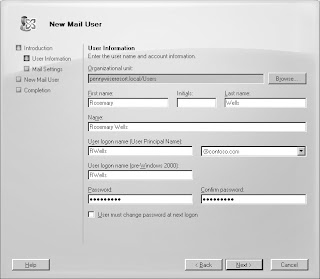
Provide account information when creating a new mail user:-
Used For Referrence: http://searchexchange.techtarget.com/generic/0,295582,sid43_gci1333150,00.html
To create a mail user in the Exchange Management Console, begin by navigating to the Mail User node under Recipient Configuration in the console tree. In the action pane, click the New Mail User link (Figure A) to start the New Mail User Wizard.

Navigate to the Mail User node:-

Beginning the New Mail User Wizard:-
Since you are creating a user within Active Directory, you first need to provide user account information on the User Information page of the wizard, as shown in Figure 3-35. Then, because the user will utilize an outside messaging system, you will need to provide his or her external email address, as shown in Figure 3-36.

Provide account information when creating a new mail user:-

Used For Referrence: http://searchexchange.techtarget.com/generic/0,295582,sid43_gci1333150,00.html
Thursday, December 4, 2008
Microsoft Exchange Server 2007 Service Pack 1 Security features
Microsoft announced Exchange Server 2007 Service Pack 1 and opened a technology preview for the software. Exchange Server 2007 SP1 features enhancements such as support for Windows Server 2008, enhanced integration with Microsoft Office Communications Server 2007, and improved mobile device management and advanced security technology.
Among other new features of Exchange Server 2007 SP1, these are security related ones:

Additional Exchange ActiveSync policies
New Exchange ActiveSync policies in SP1 build on Exchange Server 2007's robust security and management features with new policies for synchronization, authentication and encryption. For businesses with more advanced data protection needs, Exchange Server 2007 SP1 offers device, network and application controls. These new features allow network administrators to help manage and secure Exchange ActiveSync-enabled mobile devices.
Enhanced security
Microsoft also unveiled Forefront Security for Exchange Server SP1, which integrates with Exchange Server 2007 SP1 to provide an extra layer of security for even greater protection and control. Forefront Security for Exchange Server includes multiple scan engines from industry-leading security firms integrated in a single solution to help protect against viruses, worms and spam. The new service pack for Forefront Security for Exchange Server features improvements in content filtering and manageability as well as support for Windows Server 2008.
Source: net-security.org/secworld.php?id=5423
Monday, November 10, 2008
Why does the user name get rejected when some users log in to Exchange Server 2007 via POP3?
Question:- Why does the user name get rejected when some users log in to Exchange Server 2007 via POP3?
Via:mcpmag.com
Answer:- We're all familiar with the user principal name (UPN); it includes a user's log-on name, the @ symbol, followed by the domain name. Errors can occur when users have a UPN that exceeds 40 characters, which is the default limit for POP3 set by the MaxCommandSize setting. You can resolve this issue in one of two ways. The first method just increases the value of MaxCommandSize, this way:
- Start the Exchange Management Shell.
- Type Get-POPSettings to view current settings. You'll notice the default value is 40.
- To increase the value to 50 (the upper limit is 1,024 bytes), type Set-POPSettings -MaxCommandSize 50
- Restart POP3 for the changes to take effect.
Via:mcpmag.com
Tuesday, November 4, 2008
How To: Recreate OWA Virtual Directory - Exchange 2007
How To: Recreate OWA Virtual Directory - Exchange 2007. So many times I heard that OWA doesn’t work on Exchange 2007 server. There would be many reason behind it, like permission configuration, missing files, not able to load properly, .net errors etc…
There are different solutions base on various reasons but no one works then you may try by recreating OWA virtual directory which is giving problem.
Check and note the settings of directory in EMC before recreating it, like InternalURL, ExternalURL, Forms-Based Authentication settings ect..

Procedure:
- First step is to identify the directory which is giving the problem.
You can use Get-OwaVirtualDirectory to get the list of virtual directories.

- Now let’s say I have problem while accessing owa directory. Remove it with below command.
Remove-OwaVirtualDirectory “owa (Default Web Site)”

- Now create it again with below command.
New-OwaVirtualDirectory -OwaVersion “Exchange2007″ -Name “owa (Default Web Site)”

Note: if you are recreating other than owa directory which are legacy Exchange directories then you need to use “Exchange2003or2000″ in OWAVersion switch instead of “Exchange2007″
- Now configure the “owa” virtual directory settings like InternalURL, ExternalURL, Forms-Based Authentications etc… & check the OWA by logging with some test users.
Subscribe to:
Posts (Atom)


